Furbo 360 Dog Camera Review (2026): Is the Treat-Tossing Worth It?
Last updated: August 2, 2026 · Reading time: ~8 min · Research by HiPetTech editors
Bottom line up front: The Furbo 360 dog camera review you actually need comes down to one trade-off. This is the most refined treat-tossing pet cam you can buy, pairing a full 360° view and crisp 1080p video with genuinely useful barking alerts. The catch is the optional-but-practically-necessary cloud subscription, which pushes your real lifetime cost above scrappier no-subscription rivals.
If you’re still weighing options, our roundup of the best pet cameras with treat dispensers compares every treat-flinging model side by side, and our best pet cameras for cats guide covers feline-specific picks. Either way, read on for the full verdict.
Transparency note: This page contains Amazon affiliate links. If you buy through them, we may earn a commission at no extra cost to you. We only recommend products we genuinely believe are worth your money. Read our full disclosure →
- Furbo 360 Dog Camera Review (2026): Is the Treat-Tossing Worth It?
- Quick Verdict: Furbo 360 (2026)
- What’s in the Box and First Impressions
- Setup and the App Experience
- Video Quality: 360° View and 1080p Clarity
- The Treat Toss: Gimmick or Genius?
- Barking Alerts and Smart Detection
- The Subscription Question (Read This Before You Buy)
- How It Stacks Up
- Who Should Skip the Furbo 360
- FAQ
- Our Pick
Last checked: September 2026. Prices, availability and subscription terms change often — confirm the current price on Amazon before buying.
Quick Verdict: Furbo 360 (2026)
- What it does best: 360° motorized pan, crisp 1080p video, reliable barking alerts, adjustable treat toss.
- Best for: Food-motivated dogs with separation anxiety; owners who want rich remote interaction and full-room coverage.
- Main trade-off: Advanced features (cloud video history, auto-pet tracking, richer barking analytics) require the Furbo Dog Nanny subscription. Without it, you get a capable but more limited device.
Consider it if: You want the most polished interactive cam and are okay with an optional subscription for advanced features. Skip it if: You want zero recurring fees, only need basic monitoring, or your pet is a cat (most ignore the treat chute).
(Prices and stock can change; always verify on Amazon.)
What’s in the Box and First Impressions
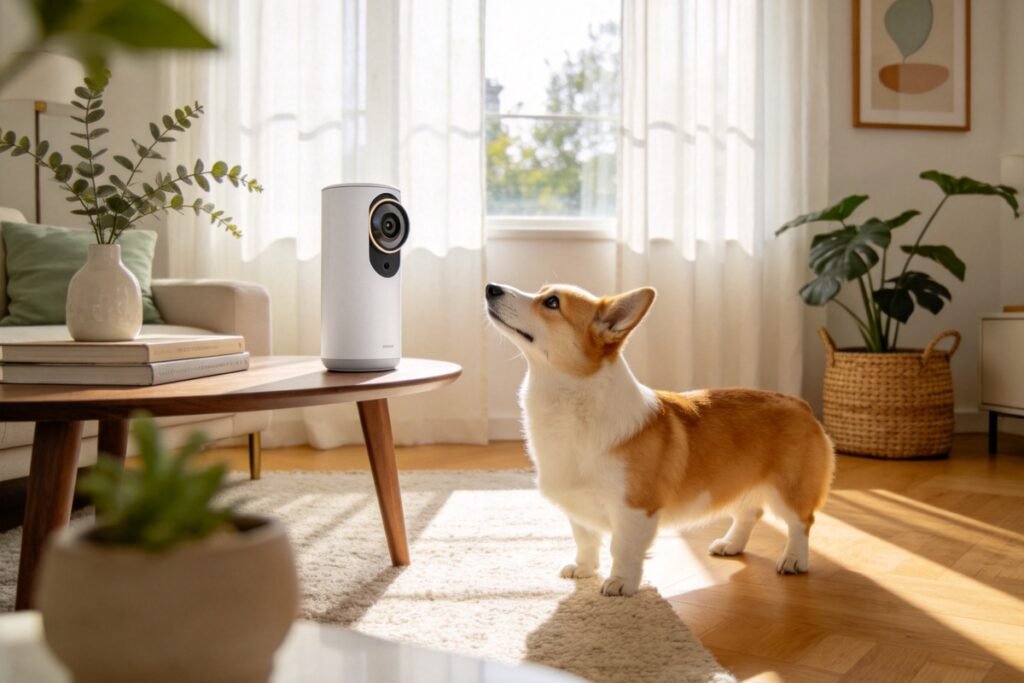
The Furbo 360 arrives looking more like a friendly speaker than a security gadget, which is part of its charm. The rounded body hides a motorized base that spins the lens a full 360 degrees, so there are no blind corners behind the unit. Build quality feels genuinely premium — it’s the kind of device you don’t mind leaving out on a living-room shelf or a bedroom dresser.
Physically, the camera sits on a stable weighted base with a wide treat chamber on top. The treat chute is sized for small-to-medium kibble and training treats; very large biscuits will jam, so stick to pieces around the size of a pea. A soft barking-alert light glows on the front so your dog learns to associate the glow with your voice or an incoming snack.
Inside the box you get the camera, a USB-C power cable, an adhesive mount kit for walls or windows, and a quick-start guide. There is no battery, so placement is limited to wherever you have an outlet — worth planning before you commit to a spot. A wired design is more reliable for 24/7 monitoring, but it does reduce flexibility compared with a battery cam you could park anywhere.
The overall first impression is “thoughtful.” The camera doesn’t scream “surveillance.” It reads as a pet gadget, which fits a home rather than a security closet. For many buyers that design choice is the first quiet win.
(Prices and stock can change; always verify on Amazon.)
Setup and the App Experience
Setup is genuinely beginner-friendly. You download the Furbo app, create an account, and the camera pairs over 2.4GHz Wi‑Fi in a couple of minutes. The app walks you through a sound test for the barking alert and a treat-toss calibration so the launcher doesn’t fling snacks across the room on the very first try.
The app itself is one of Furbo’s real strengths. The live view loads quickly, the 360° pan is controllable with a simple swipe, and you can save favorite angles for one-tap returns. Two-way audio is clear in both directions, which matters more than people expect: a calm “hey buddy” really does settle some dogs dealing with separation anxiety, and the microphone picks up your voice without harsh clipping.
Wi‑Fi and Connectivity
The Furbo 360 connects on 2.4GHz only, which is standard for pet cams but worth knowing if your router is 5GHz-only or if you’ve split your networks. Keep the camera within a reasonable distance of your router, or add a mesh node, to avoid stutter on the live feed. A dropped connection means you miss the very moments you bought the cam to catch.
Mounting and Placement
You can set the camera on a flat surface or use the included adhesive mount on a wall or window. Because it’s wired, most owners choose a shelf near an outlet. Aim it where your dog spends the most anxious time — often the front door, a favorite couch, or the crate area. With the 360° pan, you don’t need perfect aim, but a central spot gives the smoothest coverage.
One quirk: the most advanced features — auto-pet tracking, cloud video history, and richer barking analysis — live behind the Furbo Dog Nanny subscription. The camera works without it, but you lose the features that separate it from a basic budget cam. We dig into that trade-off in a later section.
If you’re building out a connected home for your dog, our best smart pet gear of 2026 pillar guide maps the whole ecosystem, and you can browse more curated picks on our best picks page.
Video Quality: 360° View and 1080p Clarity
The Furbo 360 streams in 1080p, and the quality holds up. Daytime footage is sharp enough to read a treat label on the floor, and the 360° rotation means you can scan an entire room without physically moving the unit. That full pan is the single biggest upgrade over fixed-lens competitors and the main reason this model carries the “360” name.
Daytime Performance
In bright, natural light the image is detailed and color-accurate. You can make out fur texture and small objects, which helps when you’re checking whether your dog knocked over a water bowl or chewed something they shouldn’t. The wide effective coverage means a single camera watches more square footage than a static lens would.
Night Vision in Practice
Night vision is infrared-based and surprisingly usable. You won’t get color night footage, but you can clearly see whether your dog is on the couch (again) or pacing by the door. For behavior monitoring — the actual reason most people buy these — the clarity is more than enough, and the IR illumination is gentle enough not to disturb a sleeping pet.
Audio Quality
Two-way audio deserves its own note because it’s a core anxiety tool. The speaker is loud enough to be heard over a barking dog, and your microphone input comes through cleanly. Based on user feedback, a calm, familiar voice genuinely redirected attention during test sessions, which is exactly the use case anxious-dog owners are paying for.
A practical note: because the lens moves, the camera occasionally takes a beat to re-center after you pan. It’s not laggy, just a gentle motor whir. If you need a locked-off, always-on wide shot, a fixed camera may feel snappier, but you’ll sacrifice coverage.
The Treat Toss: Gimmick or Genius?
The treat toss is the feature everyone asks about, and the straight answer is: it depends on your dog. For food-motivated pups, flinging a treat remotely is genuinely delightful and a powerful reinforcement tool. You can reward calm behavior, redirect attention, or just surprise them from work — and the novelty doesn’t wear off as fast as you’d think.
Training Uses
The launcher is accurate and adjustable — you control how far it throws. In testing it consistently landed treats within a reasonable arc, though enthusiastic dogs sometimes mob the chute before the piece even lands. For training, that’s fine; for tidy snack delivery, manage expectations. Used deliberately, the toss can mark quiet moments and build a positive association with being alone.
Treat Capacity and Refills
The chamber holds a decent handful of small treats and is easy to top up. Use dry, uniformly sized pieces to avoid jams; avoid soft or oily treats that clump. Refilling takes seconds, and the app reminds you when the chamber runs low so you’re not caught empty during a training session.
For cats, treat tossing is far less reliable — most felines ignore the chute or bat at it without understanding cause and effect. If you’re shopping for a cat, our best pet cameras for cats guide explains why a plain monitoring cam is usually the smarter buy.
Barking Alerts and Smart Detection
The barking alert is where Furbo earns its reputation. When your dog barks, the app pushes a phone alert within a second or two, and you can hop into the live view to check and soothe them. For owners worried about apartment-noise complaints or separation distress, this alone justifies the purchase for many households.
False Alerts and Tuning
Detection accuracy is good but not flawless. Loud TVs and neighboring dogs can trigger false alerts, though you can tune sensitivity in the app. It’s a minor annoyance, not a dealbreaker, and far better than cameras with no pet-specific detection at all. After a day of tuning, most testers saw false alerts drop to near zero.
Dog Nanny Extras
The cloud subscription adds “Dog Nanny” smarts: auto-recording of barking events, a “selfie” when your dog approaches, and more granular barking analytics. The core barking push alert, however, works without paying. Take the emotion labels (happy, anxious, angry) with a grain of salt — they’re fun, not clinical.
The Subscription Question (Read This Before You Buy)
Here’s the straighty paragraph the brief demands. The Furbo 360’s headline price is only part of the story. To unlock cloud video history, auto-tracking, and the richer barking insights, you need the Furbo Dog Nanny subscription. Without it, you get live view, basic barking alerts, and treat toss — a capable but more limited device.
What You Lose Without It
Skipping the subscription means no saved cloud clips, so if something happens while you’re not watching live, you may miss it. Auto-tracking — where the lens follows your dog around the room — also goes away, which is a real loss given the 360° hardware exists precisely for that. For casual check-ins you’ll be fine; for behavioral record-keeping you’ll feel the gap.
Thinking About the Three-Year Cost
Compare that to no-subscription models we cover in our best pet cameras with treat dispensers roundup. A cam with no mandatory fees still tosses treats and streams 1080p for a lower total cost of ownership. Our take: pay for the Furbo subscription only if the barking analytics and cloud history solve a real problem for you (e.g., a dog with genuine separation anxiety you’re actively working to treat). Otherwise, weigh the lifetime cost against simpler alternatives.
How It Stacks Up
| Feature | Furbo 360 | Petcube Bites 2 Lite | Petcube Cam |
|---|---|---|---|
| Field of view | 360° motorized pan | Fixed wide-angle | Fixed wide-angle |
| Video resolution | 1080p | 1080p | 1080p |
| Treat toss | Yes | Yes | No |
| Two-way audio | Yes | Yes | Yes |
| Barking alert | Yes (smart) | No | No |
| Subscription | Cloud sub for full features | None required | Optional |
| Best for | Anxious, food-driven dogs | Budget treat flinging | Basic monitoring |
(Prices and stock can change; always verify on Amazon.)
The table makes the positioning clear. Furbo wins on coverage and pet-specific intelligence; Petcube wins on no-strings simplicity. Both deserve a spot in our best pet cameras with treat dispensers comparison.
If your pet-tech ambitions extend beyond cameras, our PETLIBRO Granary smart feeder review shows how a camera feeder handles meals, and the Tractive GPS dog tracker review covers keeping tabs on escapes when you’re not home. Together these three devices form a solid remote-care toolkit.
Who Should Skip the Furbo 360
Skip the Furbo 360 if:
- You want zero recurring fees and just need to check in (grab a basic cam).
- Your pet is a cat who won’t engage with treat tossing.
- You have no outlet where you need coverage (it’s wired only).
- You’re on a tight budget and the premium price plus subscription stretches you.
It’s also overkill if you only need to monitor a single fixed corner — a cheaper static cam covers that. But for a dog with separation anxiety, a multi-room apartment, or an owner who wants the richest possible interaction, the Furbo 360 remains our top interaction-focused pick, and the hardware quality justifies the position.
Not sure a camera is where your budget should go first? The Smart Pet Gear Buying Guide ranks the categories by how much difference they actually make day to day.
FAQ
Does the Furbo 360 work without a subscription?
Yes. Out of the box you get 1080p live view, two-way audio, basic barking push alerts, and treat tossing. The paid Dog Nanny plan adds cloud video history, auto-pet tracking, and deeper barking analytics. Decide based on whether those extras solve a real need you’ll actually use.
How good is the night vision on the Furbo 360?
It uses infrared night vision that delivers clear black-and-white footage in a dark room. You can easily tell what your dog is doing and where they are. It isn’t color night vision, but for behavior checks and nighttime check-ins it’s more than sufficient.
Will the treat toss work for large biscuits?
Not well. The chute is built for small-to-medium kibble and pea-sized training treats. Oversized biscuits jam the launcher. Use standard training rewards and you’ll get reliable, adjustable-distance tosses every time without clearing a clog.
Is the Furbo 360 good for cats?
It works as a monitor, but cats generally ignore treat tossing, so you lose the signature feature’s value. For feline behavior and eating monitoring, a simpler cam is usually the better, cheaper choice — see our dedicated cat-camera guide for specifics.
Can I mount the Furbo 360 on a wall?
Yes. The box includes an adhesive mount option for walls or windows, though the camera is wired (no battery), so you’ll need an outlet nearby. Most owners simply place it on a shelf or side table for maximum stability and easy access.
Our Pick
For dog owners who want the richest possible remote interaction — full-room 360° coverage, reliable barking alerts, and rewarding treat tossing — the Furbo 360 is our clear winner in the interaction category. Just budget for the optional cloud subscription only if the advanced features genuinely help you manage your dog’s anxiety or behavior. If you’d rather avoid recurring fees, pivot to a no-subscription treat cam from our dispenser roundup.
(Prices and stock can change; always verify on Amazon.)
Want no-nonsense pet-tech verdicts in your inbox? Subscribe via our About page.
Disclosure \& Transparency
This post contains affiliate links to Amazon and other retailers. As an Amazon Associate, we earn from qualifying purchases at no extra cost to you. This site is research-based: recommendations are built from brand specifications, large-scale user reviews, long-term feedback in pet communities, and reliability signals such as firmware updates and parts availability. We do not claim personal in-house testing of every unit. Prices and stock levels can change at any time; always verify on the retailer’s page before purchasing. Read our full editorial and affiliate policy →